IntelliLock GUI Overview Home

Introduction
Welcome
System Requirements
Graphical User Interface
Overview
Main Panel
Menu/Bar Items
GUI Elements
Assembly List
Assembly Properties
License Generator
License Information
Lock Settings
Master Key
Protection Settings
Licensing System
Understanding The License System
Hardware ID
Hardware Lock
License File
Locks
Master Key
SDK
General Information
IntelliLock.Licensing.dll
IntelliLock.LicenseManager.dll
IntelliLockDB.dll & System.Data.SQLite.DLL
Definitions
Mapping File
Merge Assembly
Obfuscation
Pack Assembly
Tools
License Check
Hardware ID Check
Stack Trace Deobfuscator
License Reactivator
Testing
Library - Test Environment
Examples
Lock An Assembly
Unlock An Locked Assembly
Ordering
Register Online
License Agreement
Why register?
Support and Contact
Technical Support
Contact
Command Line Parameters
Visual Studio Add-In

IntelliLock GUI Overview
 

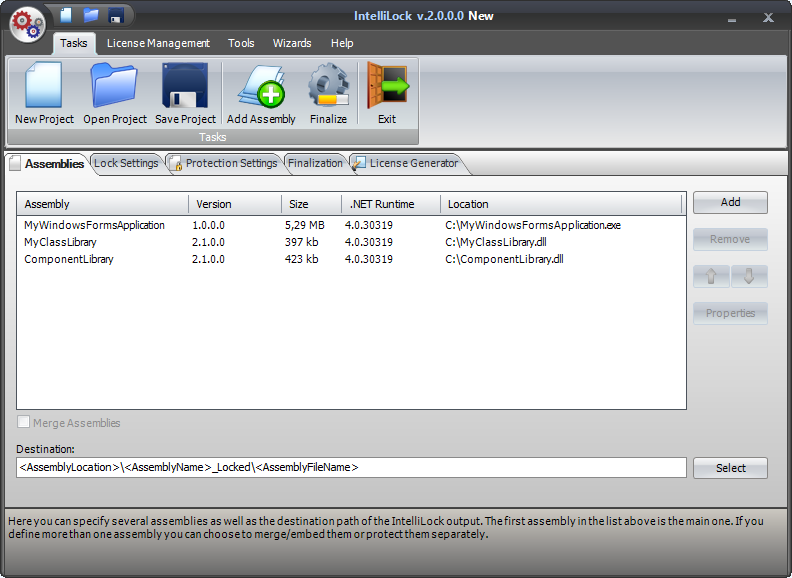
The IntelliLock UI is comprises of a menu/bar system and the Main Panel. The menu system provides access to all functions and tools. The Main Panel provides access to the categorical features of your IntelliLock project. Each of these features is explained by the following topics.


© Copyright 2008 EZIRIZ