Using a variety of evaluation locks, IntelliLock gives you the ability to control use of your assembly in a variety of ways - trial versions, software rental, custom locks, software as a service - all are possible using IntelliLock locks, and all without any modifications to your source code. We recommend that you spend some time to understand these license enforcement options as the time you invest in doing so will be time well spent.
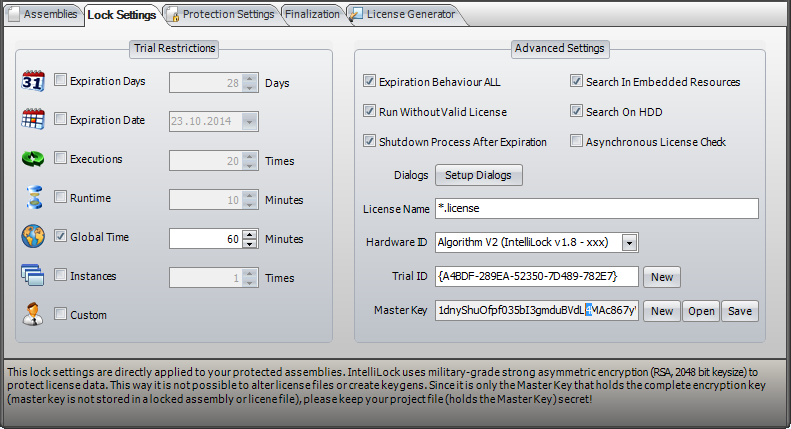
In the Lock Settings page you specify the licensing controls you want IntelliLock to build into your assembly when you protect it. These locks are implemented by additional code which IntelliLock includes in the protected assembly and requires no changes to your assembly source code to implement. One of the powerful features of IntelliLock licensing is that the settings you inbuild into your assembly can be overridden by providing a license file to your customer, meaning you do not need to supply a separate licensed version of your program - the trial version and full version are exactly the same, the only difference being the license file you provide to paying customers.
Expiration Days - Your application will work for the specified number of days from the date of first installation on a computer.
Expiration Date - The Expiration Date lock allows you to specify the exact date on which your assembly should expire. This is useful for example for beta test versions and for software rental (where you can specify the expiration date as the day following the last date the customer has paid for the use of your software).
Executions - This lock, if enabled, causes your application to expire after the specified number of executions.
Runtime - The user can run the assembly for an unlimited number of time, but the apllication will shut down each time it is run, after the specified number of minutes.
Global Time - This option set an exact amount of total minutes that your assembly can stay in memory.
Instances - This lock, if enabled, allows you to specify the maximum number of copies of your application the user is allowed to run at the same time. Please note that exceeding the specified number of instances does NOT cause your application to expire.
Custom - This lock, if enabled, enables trial mode without using the locks above. This is really helpful if you want to use your own trial restrictions. To determine the current license status please use the InteliLock SDK.
Expiration Behavior All
When enabled causes the expiration of the assembly only when all other enabled locks have expired.
When disabled the assembly expires when any one of the locks expires. This is a very powerful option, enabling you to (for example) implement a trial period which is either 30 days or 50 uses. It is worth spending a little time considering the flexibility which this option offers.
Run Without License File - Set to false to require a valid license for operation. If true, enabled Inbuild Locks are honored. If a valid license file is found the Locks settings are overridden with the license file settings. To use this option at least one trial lock or the custom lock must be enabled.
Shut Down Process After Expiration - Terminates the running process upon expiration.
Search In Embedded Resources - Enable this option to search for license files in the embedded resources of calling assemblies.
Search On HDD - Enable this option to search for license files in the location of your locked assembly. If you want to load a license directly please use the IntelliLock SDK.
Asynchronous License Check - Check this option to improve the startup time as the license status is checked in the background. As soon as the license check is finished the event EvaluationMonitor.LicenseCheckFinished (IntelliLock.Licensing.dll) will be raised. In case this option is enabled please don't check the license status or call HardwareID.GetHardwareID(...) until EvaluationMonitor.LicenseCheckFinished is raised.
Dialogs - Here can can specify various dialogs which are shown depending on the license status. The number of possible dialog boxes may seem large, and you may worry that your customer will see numerous dialog boxes when the locks expire. This is not the case, the IntelliLock licensing system will only ever display one dialog to your user. IntelliLock determines which is the most important dialog and displays that one only. Nag Screen - We are all familiar with nag screens in applications, reminding us to purchase the product before the trial period expires. This option allows you to specify whether to display a nag screen to your user, again without any modification to the source code of your assembly.
License Name - Specifies a license file name or extension (*.myextension). To avoid conflicts with optional methods of extending license behavior, binary IntelliLock licenses do not use the .LIC extension reserved to .NET license classes.
Hardware ID - Please define a Hardware ID generation algorithm. The algorithm is automatically used by the SDK method HardwareID.GetHardwareID(...).
Trial ID - Change the Trial ID to ignore previous trials and begin a new trial period. This is useful if you want to release a new version of your software and allow users to start a new trial period.
Master Key - To create valid license files, the same master key must be used for license creation as was used to produce IntelliLock locked output. This master key is generated when you create your project, which must be saved to preserve the original key. Never hand out the Master Key to anybody!